 Can everyone read it?
scan a11y → check a11y tree
An app with no DOM to read
A canvas app paints its UI and exposes only an accessibility tree, so DOM contrast rules read every label as 1.00:1. scan a11y writes the tree plus the frame; check a11y tree judges it, with contrast taken from the frame's pixels.
Open the page under test · fixtures/a11y-tree/flutter-like.html
Run it
vlmkit scan a11y fixtures/a11y-tree/flutter-like.html --out {out}/a11y.json
vlmkit check a11y tree {out}/a11y.json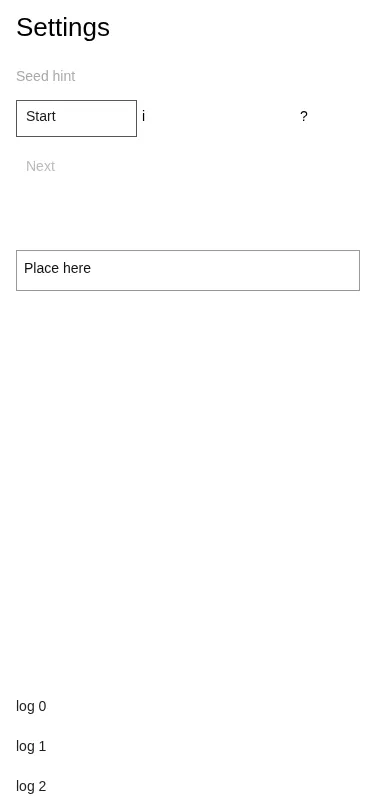
What to look at
Four kinds of finding from one frame: a text field with no name, content past the bottom that nothing scrolls to, a 2.32:1 hint, and a 20x20 target.
The fix
Label the field, make the log scrollable, darken the hint, grow the Info target to 24px.
What vlmkit printed
vlmkit scan a11y fixtures/a11y-tree/flutter-like.html --out {out}/a11y.json · exit 0
vlmkit scan a11y  flutter-web
source: fixtures/a11y-tree/flutter-like.html

tree:  <out>/a11y.json  (375x812)
frame: <out>/a11y.png
  36 node(s), 30 named, 7 operable

judge it without a browser:
  vlmkit check a11y tree <out>/a11y.json
vlmkit check a11y tree {out}/a11y.json · exit 1 — the command fails, as a gate in CI would
vlmkit check a11y tree  flutter-web, 375x812
source: <out>/a11y.json  frame: <out>/a11y.png

36 node(s), 6 operable; 9 text node(s) measured on the frame, 21 skipped (disabled, outside-frame, no-ink)
touch floor 24 (AA); 1 undersized but spaced (2.5.8 exception); 1 smaller target(s) inside a target that meets it, judged as that one

✗ [unlabelled-control] textfield with no accessible name (200x30 at 16,200) — a screen reader announces only "textfield"
✗ [unreachable-content] 4 named node(s) past the bottom edge with nothing that scrolls to them — first: "log 3" (60x18 at 16,820) in n1>n10
✗ [contrast-below-aa] "Seed hint" 2.32:1, needs 4.5:1 — rgb(170, 170, 170) on rgb(255, 255, 255) (text 12.2, measured)
✗ [target-undersized] 20x20 (min side 20, need 24) — "Info"